
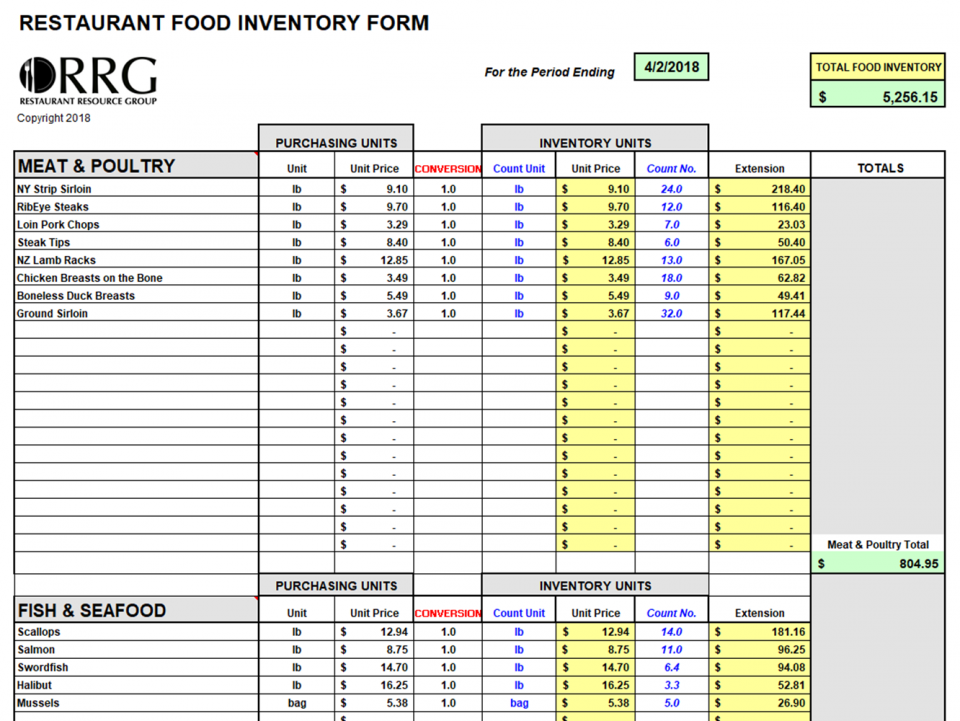
Food and Beverage Inventory Workbook
Counting and calculating your end of week or month food and beverage inventory is effortless with this spreadsheet. You will need to invest a few hours of upfront time to input your restaurant's specific product list and unit prices (from your Vendor invoices).
Count & Account for Your Month Ending Food & Beverage Inventory To Produce Accurate Profit and Loss

by John Nessel, Restaurant Resource Group
This article is from the Restaurant Operators Complete Guide to QuickBooks. It is intended to explain the importance of taking accurate and timely physical counts of your food and beverage inventories and to show you how to make a series of simple QuickBooks accounting entries (or any other accounting software program that you use) to insure accurate food and beverage cost reporting for your critical Profit and Loss Statements.
First, let me explain why counting your food and beverage inventory and accounting for inventory changes is so important. Along with labor, your food and beverage costs are by far your largest restaurant expenditures. The Restaurant Industry Operations Report (produced by the National Restaurant Association and Deloitte) indicates "median" food and beverage cost of sales is 33% of total sales. Along with Labor expsenses, food and beverage costs are your most controllable expenses, and are often the difference between your success and failure.
It is nearly impossible to make any kind informed management decision that impacts your food and beverage costs if you do not take a periodic "physical count" of your inventory (monthly is best if you are using monthly accounting periods). I will take that one step further and tell you that you cannot even know what your actual food and beverage costs are without taking an accurate month (or period) end inventory.
The reason for this is simple and takes only the most basic math to demonstrate.
Defining Food & Beverage Costs
Using "food" as an example, your actual monthly "food" cost can be calculated as follows:
(Beg Inv + Purchases – End Inv) / Sales = Food Cost %
Beg Inv = Beginning of the Month Food Inventory
Purchases = Total Food Purchases During the Month
End Inv = Ending Food Inventory
Sales = Total Food Sales for the Month
Most restaurants use their monthly generated Profit and Loss Statement (P & L) to tell them what their "food cost" was for the prior month. But without making adjustments for changes in inventory that occurred during the month, the P& L will simply give them a number that represents their food purchases for the month.
This distinction is the difference between "food costs" and "food purchases".
- Food costs are the total food actually used or consumed to generate the food sales that you recorded for a specific time period
- Food purchases (what your accounting system will produce if no inventory adjustment is made) simply tells you how much food you purchased during the month.
A simple example will make this distinction clear. Lets say that you take a complete food inventory count at the close of business on March 31st and then again at the close of business on April 30th. Using the numbers below for the two inventory counts and your total April food purchases and corresponding sales here is the information that you have:
March 31st Food Inventory = $2,500
April Food Purchases = $20,000
April Food Sales = $60,000
April 30th Food Inventory =$4,500
If you do not make any inventory adjustment to your accounting system (e.g. do not account for the difference between the beginning and ending food inventory totals) then your P & L will indicate that your food cost percentage for the month of April is simply the April food purchases divided by the April food sales (as shown below)
$20,000 / $60,000 = 33.3% = Food Cost %
On the other hand if the inventory change from March 31 to April 30 is taken into account by a QuickBooks inventory adjustment then your Profit & Loss statement will show your Food Costs percentage for the period to be:
($2,500 + $20,000 -$4,500) / $60,000
$18,000 / $60,000 = 30% = Food Cost %
The food cost equation tells you that you actually spent $18,000 (not $20,000) to generate $60,000 of sales. The 3.3% variance is highly significant in a business with average profit margins in the 2%-6% range!
Note: The less your total monthly sales are, the larger the variance will be, so taking inventory, and making end of month adjustments, becomes even more important for smaller volume restaurants!
Segregating Food & Beverage Costs by Category
Now that you understand the overall importance of counting and adjusting your inventory, let's take the process another step.
The extent to which you can track your Food & Beverage purchases and sales by category (Food, Non Alc Beverage, Beer, Wine, and Liquor) dramatically improves the quality of your information because it is easier to identify where potential problems exists!
While it is important to know what your total food and beverage costs are as a percentage of total sales, it is difficult to take action and make effective management decisions if you can't distinguish whether an identified problem is the result of your food costs, your wine costs, your liquor costs, or some combination of them all.
You therefore need to set up your Chart of Accounts in a way to allow you to track this key information. This means that you must have matching or corresponding Inventory, Revenue and Purchase accounts for each food and beverage category that you are monitoring. This "set up" allows you to make the proper End of Month inventory adjustments to produce accurate Food & Beverage costs as a percentage of sales in each category.


Tip: If you want to create more detail in the Food Category than illustrated above, simply add additional General Ledger accounts (or sub-accounts). For example you might create sub-accounts for coffee, beverage, soup, salad and sandwiches under the Food Inventory, Food Purchases and Food Sales accounts, to track each food component separately.
How to Make the Inventory Adjustment in QuickBooks
It took us a while to get here but hopefully the journey was worthwhile.
I am not going to spend any time discussing how to efficiently take your End Of Month inventory, but I will refer you to the Restaurant Resource Group web site where you can download an Excel spreadsheet designed to make the job easy (Click here)
After you have completed your inventory you will have five totals; one each for food, non alcoholic beverages, beer, wine and liquor on hand. The next step is to "compare" each current amount with the preceding months inventory (as indicated on the Balance Sheet dated the last day of the prior month), and determine the amount that the current total either exceeds or has been reduced during the prior month.
You will use a QuickBooks General Journal Entry to record these changes on the last day of the accounting period being adjusted (From the QuickBooks Menu Bar select Company...Make General Journal Entries...). A Journal entry is simply an accounting entry that requires the manual inputs of dollar amounts, in either a Debit or Credit column, associated with each "account" you are changing (don't worry about the Debit or Credit part as the instructions below will make that clear). Here are the rules for the making your entries:
Ø If the inventory total of an account (e.g. food) has increased during the accounting period then you will debit the inventory account by the amount of the increase and credit the purchases account by an equal amount.
Ø If the inventory account in question decreases during the month then you will credit the inventory account the exact amount of the decrease and debit the purchases account by the same amount.
You will repeat this process for each of the five accounts (food, non alc beverage, beer, wine and liquor).
Now let's use some concrete numbers and an actual Journal Entry to make this procedure clear.
ALERT: Make sure that the date of the Journal Entry below corresponds to the last day of the accounting period being adjusted (e.g. April 30). Otherwise the adjustments will not be reflected in the correct accounting period and your P & L will not reflect the true cost of goods sold.


What If You Have Not Tracked Inventory in the Past?
If you don't currently have any Inventory accounts (Asset accounts on your Balance Sheet), and would like to use this method, here is what to do. First off you need to create the appropriate Inventory accounts in your Chart of Accounts. Make sure that they match your purchase and income accounts (which may need to be reorganized as well). At the end of the current month (or accounting period) you will record your first inventory, and enter the results in a General Journal entry as follows:
Debit each new Inventory account by the amount of the total inventory counted.
Credit an equal amount to the General Ledger #3999 Opening Bal Equity account.
(Make sure to tell your accountant that your are doing this because he/she will need to offset the total credit balance of the Opening Balance Equity account at the end of the year to your Retained Earnings account). Now you will have an accurate starting inventory recorded in QuickBooks. Beginning with the next inventory (end of the next month) you will make the adjusting entries discussed previously.


